
Aurebesh Fonts: Download TTF & OTF for Windows and Mac
Download AurebeshTranslate Regular, an original Aurebesh font for writing Star Wars-style lettering in compatible desktop applications. The typeface contains the 26 basic Aurebesh letters, eight optional digraph glyphs, and characters for ordinary numbers and punctuation. Choose a TTF or OTF file for installation, or download the complete font package.
ABCDEFGHIJKLMNOPQRSTUVWXYZ
HELLO WORLD
The local Aurebesh font is loading or unavailable.
The font styles Latin text; copying does not create independent Unicode Aurebesh characters. The optional digraphs require compatible font shaping in external applications. Review font licensing and artwork approval before publishing downloads.
The preview above shows the font’s lettering, including an A–Z specimen and a sample phrase. The downloads are for working with Aurebesh typography outside the website. If you only need to convert a finished line of English text, the Aurebesh translator provides an immediate on-page result.
Download AurebeshTranslate Regular
The resource offers three download choices. TTF and OTF contain the same Aurebesh character design; they are alternative desktop font formats, rather than different alphabets or styles.
| Download | Best suited for | What you receive |
|---|---|---|
| TTF | Installing the font on Windows or macOS | A TrueType font file |
| OTF | Desktop applications that accept OpenType fonts | An OpenType font file with CFF outlines |
| Font package ZIP | Keeping the full release together | TTF, OTF, a WOFF2 webfont, a glyph specimen, mapping information, license notes, and font source files |
Choose one of the desktop formats for ordinary installation; you generally do not need to install both versions of the same font family. Use the ZIP if you want the accompanying reference and documentation. The WOFF2 file is intended for compatible web-font implementations, not as the usual desktop installation choice.
The font appears in supported applications under the family name AurebeshTranslate, in the Regular style.
What Characters Does the Font Include?
AurebeshTranslate Regular maps the Latin letters A–Z and a–z to the 26 Aurebesh basic letterforms. Uppercase and lowercase inputs use the same basic glyph shapes in this release; typing a capital does not automatically create a mirrored symbol.
The font also includes the eight traditional two-letter forms: AE, CH, EO, KH, NG, OO, SH, and TH. These combined characters are available as optional ligatures, so they do not automatically replace the two basic letters in every application.
Digits 0–9, spaces, and common punctuation are included for ordinary labels and sentences. The font is built around the traditional Aurebesh character repertoire; it is not a general replacement for every writing system or every symbol available in Unicode.
For a close-up reference showing which glyph represents each letter, use the interactive Aurebesh alphabet. The font specimen above is intended to demonstrate the typeface as lettering, rather than provide character-by-character instruction.
How to Install an Aurebesh Font
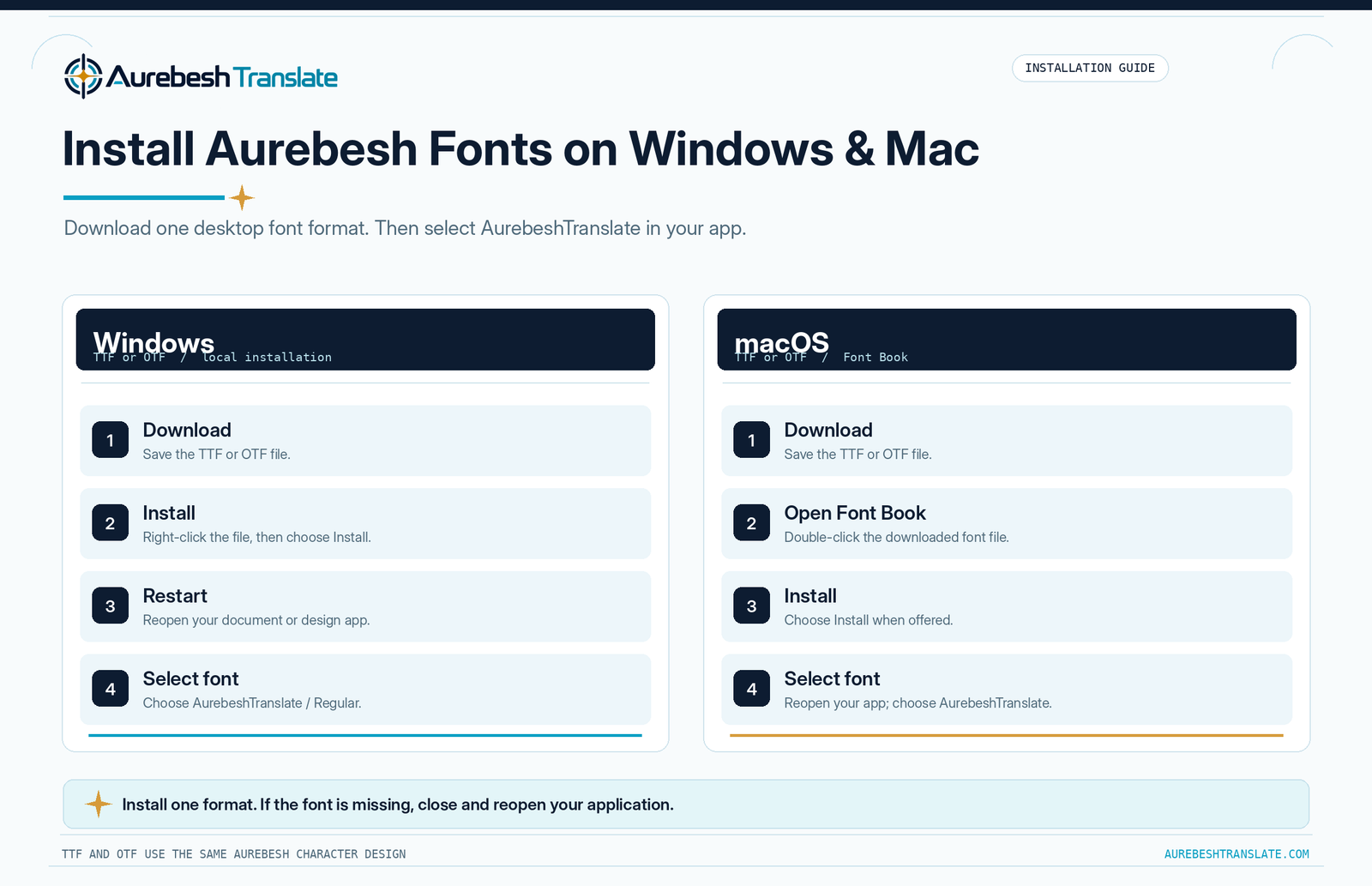
Download the TTF or OTF file first. If you chose the ZIP, extract it and locate the font file inside. Installation adds the typeface to your device’s available fonts; it does not automatically change the font used by every document or website.
Install on Windows
- Download TTF or OTF, or extract the font file from the ZIP.
- Right-click the font file and choose Install. Depending on your setup, Install for all users may also be available.
- Open or restart the application where you want to use the font.
- Find AurebeshTranslate in the application’s font selector and apply the Regular style to your text.
If the font does not appear immediately, close and reopen the application. You can also check installed fonts in Settings → Personalization → Fonts on supported Windows versions.
Install on macOS
- Download a TTF or OTF file and extract it first if necessary.
- Double-click the font file to open it in Font Book.
- Review the preview and select Install if offered.
- Restart your document or design application if it was already open, then select AurebeshTranslate from its font menu.
Font Book may flag a duplicate installation or a file issue; review any warning rather than installing multiple copies indiscriminately. An installed font will only appear in applications that support using local fonts.
How to Type with AurebeshTranslate Regular
Once the font is installed, open a compatible text editor or design program, type your wording with ordinary Latin keys, and select AurebeshTranslate as the font. For example, typing REBEL BASE produces Aurebesh letterforms while the underlying editable text remains REBEL BASE.
This approach is useful for designing signs, document headings, equipment labels, and other lettering you may want to revise. You can change a word, adjust its size, or alter spacing just as you would with other installed fonts. Use the application’s alignment and text-layout controls for precise placement.
Installing a font on your computer does not guarantee that a browser-based editor will offer it. Some online document services limit font choices to their own supported libraries. If the font is absent from an online editor’s menu, use a desktop application that supports installed fonts or prepare a rendered image instead.
How to Use the Eight Optional Digraphs in the Font
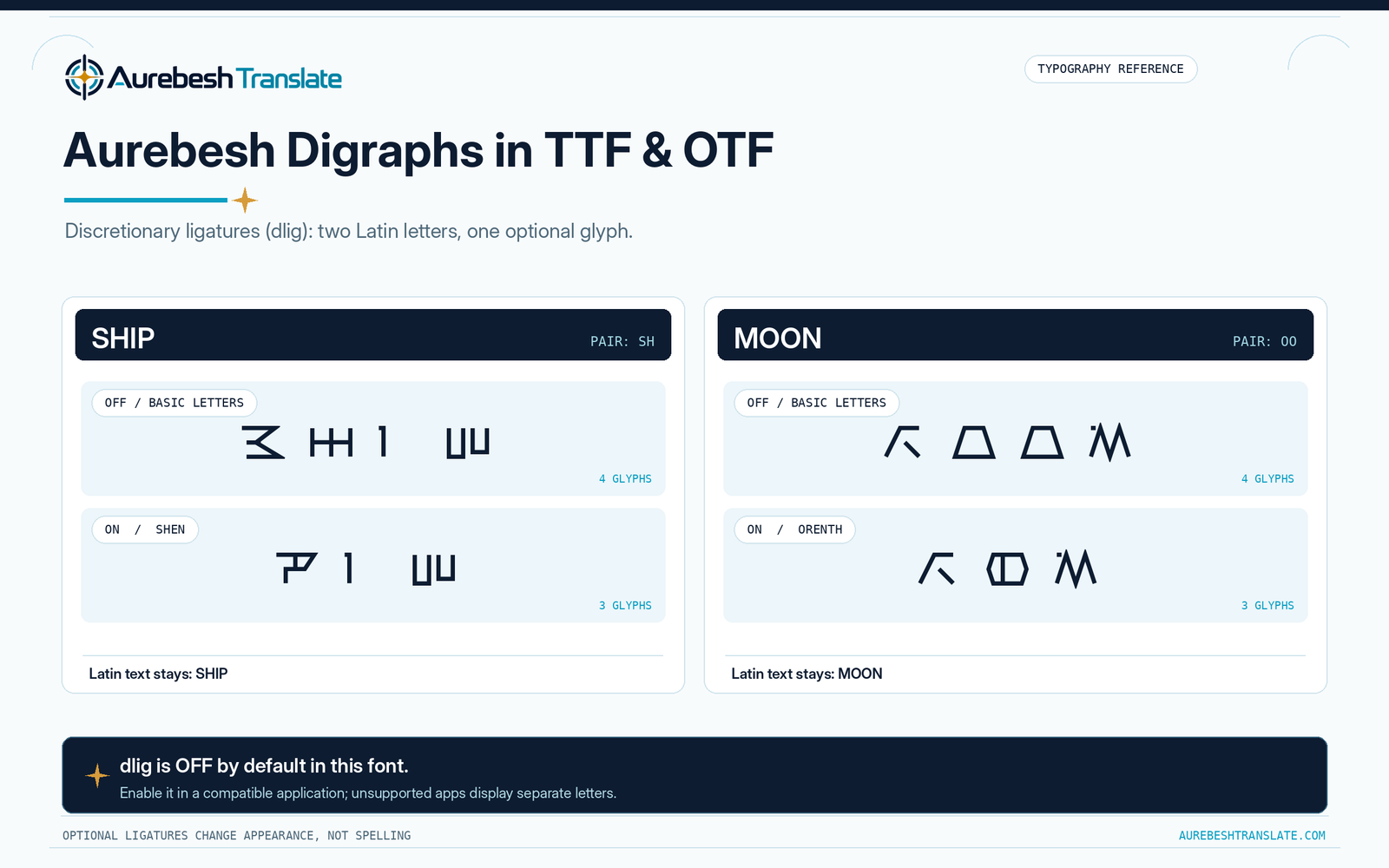
The additional Aurebesh characters are implemented through an OpenType feature called discretionary ligatures, identified as dlig. Where an application supports this feature, enabling discretionary ligatures can combine the corresponding letter pairs into single glyphs.
For instance, SHIP normally displays four basic letterforms. With discretionary ligatures enabled, SH can display as the single Shen glyph followed by I and P. Likewise, the OO in MOON can display as Orenth. The letters stored in the text remain unchanged.
These ligatures are off by default. Some applications expose a discretionary-ligatures option in typography or OpenType settings; others do not support it or provide no control. If the option is unavailable, the text remains readable using two separate Aurebesh letters. That is a valid representation, not a faulty font installation.
The Aurebesh digraphs guide covers when the combined characters are used in the writing system. For the technical meaning of this OpenType setting, see Microsoft’s specification for discretionary ligatures.
Sharing Aurebesh Text Without Losing Its Appearance
An installed font changes how characters are displayed, not what every receiving device will store or recognize. If you copy a line that looks like Aurebesh and paste it into an application using an ordinary font, the original Latin letters may become visible.
Likewise, someone opening your document on another computer may see a substitute font if AurebeshTranslate is not installed or included in the file. Before sharing an editable document, check whether the receiving application supports the font and whether its export settings preserve or embed fonts.
If the appearance must be identical for every recipient, use a suitable image or verify a PDF export at the final size. The Aurebesh keyboard offers PNG export for shorter composed messages. For a deeper explanation of stored characters versus displayed glyphs, see Aurebesh Unicode and copy-and-paste.
Common Aurebesh Font Problems
| Problem | What to check |
|---|---|
| The font is installed but missing from a program. | Restart the program and confirm that it supports locally installed fonts. Check the name AurebeshTranslate. |
| Text still appears as ordinary Latin letters. | Select the AurebeshTranslate font for the text, and confirm that the font was installed successfully. |
| SH, TH, or OO remains as two symbols. | The digraphs are discretionary. Check whether your application supports and has enabled dlig. |
| Letters look different after opening a file elsewhere. | The other device may not have the font. Check font embedding or share a verified image/PDF. |
| A special character does not render in Aurebesh. | The font covers defined Latin characters and common punctuation, not every Unicode character. A fallback font may be used. |
| A previously installed version seems to remain in use. | Close the application, check for duplicate font installations, and reopen the file. |
If you find an issue with a supplied file, report the application, operating system, and the text involved through our contact page so the problem can be investigated.
Font Licensing and Responsible Use
AurebeshTranslate Regular is independently developed for this website. It is not an official Lucasfilm or Disney font, and the download does not grant rights to Star Wars names, logos, trademarks, or other protected material.
The complete font package includes licensing information. Check the applicable license before modifying, redistributing, repackaging, or using the files commercially. Being able to download a font does not, by itself, establish permission for every possible use. Our Terms and Conditions explain the site’s general approach to downloadable resources and third-party rights.
Author: Austin Miller
Editorial review: Reviewed by the AurebeshTranslate.com Editorial Team.